


1. What is Gate for AI Agent
Gate for AI Agent is Gate’s official AI trading infrastructure, enabling AI Agents to directly access Gate’s trading, market data, on-chain data, wallet, and payment capabilities through standardized interfaces. No manual trading interface operation is required—simply issue a natural language command to complete the entire process, from market inquiry to live order placement.
With Gate for AI Agent , you can have your AI Agent handle the following tasks for you:
- News Subscription: “Notify me immediately if there’s major news about SOL”
- Market Analysis: “Analyze the BTC candlestick trend over the past 7 days”
- One-Click Order Placement: “Go long SOL at market price, take profit at 200, stop loss at 160”
- DEX Transfer: “Transfer tokens with a single command”
- DEX Swap: “Swap 500 USDT for ETH using the optimal route”
- Agent Payment: “Send 100 USDT to this address”
2. Two Access Methods
Gate for AI Agent offers two access methods: MCP and CLI. Choose according to your usage preferences:
MCP (Model Context Protocol)
Complete trading operations through natural language conversation with your Agent. Supports two deployment modes:
- Remote MCP: Connect via OAuth authorization, no need to manually configure API Key. Recommended for most users.
- Local MCP: Runs locally, requires API Key configuration. Suitable for users with higher data security requirements.
Supported AI clients include Claude Code, OpenClaw, Cursor, Codex, ChatGPT, and all MCP-compatible clients.
CLI (Command Line Interface)
Directly call all Gate APIs via terminal commands, outputting standardized JSON data. Ideal for script automation, scheduled tasks, and quantitative strategy development.
| MCP | CLI | |
|---|---|---|
| Interaction | Natural language conversation | Terminal command line |
| Suitable For | AI chat client users, Vibe Coders | Script automation, quantitative strategy developers |
| Deployment | Remote (OAuth) or Local (API Key) | Local installation + API Key |
3. Getting Started
MCP Access
Step 1: One-Click Installation
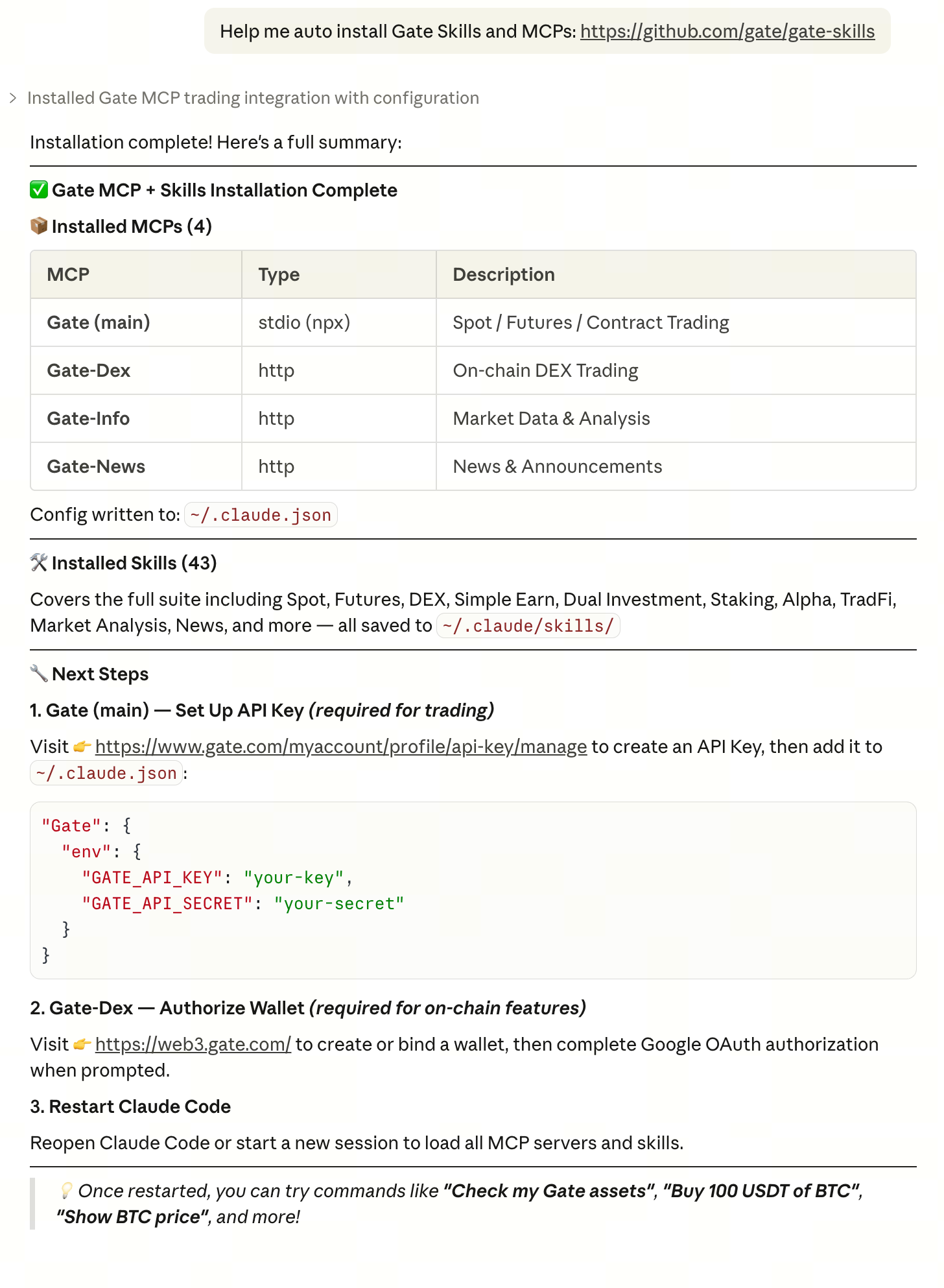
In any MCP-supported client, enter a single command to automatically configure all Gate MCPs and Skills:
Help me auto-configure Gate Skills and MCPs: https://github.com/gate/gate-skills- Automatically detects client type (Cursor / Claude Code / Codex)
- Installs all Skills + all MCP endpoints automatically
- No manual configuration file editing needed
Example with Claude Code:
Step 2: Try It Out
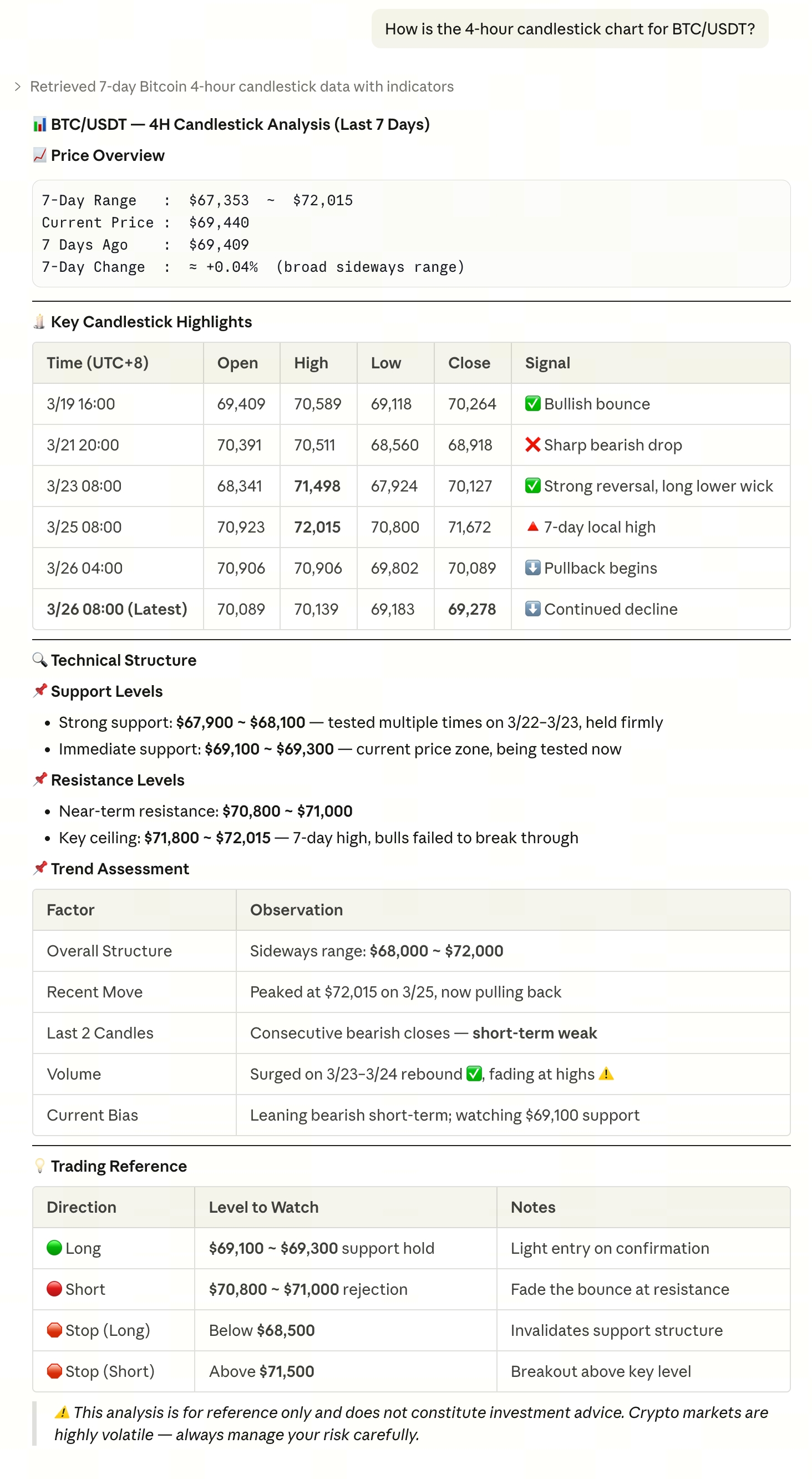
Query market data directly with natural language:
What’s the current price of BTC? How’s the 4-hour candlestick chart for ETH/USDT? What are the latest BTC news from the past week? Please summarize.For news and market-related MCPs, no API Key or login authorization is needed—just configure and use.
Example with Claude Code:
Step 3: Start Trading
Without your explicit authorization, no AI Agent can operate your funds. When placing orders, checking balances, or managing assets, the system will require you to complete an authorization confirmation. You can always review and revoke granted permissions on the Gate API management page.
https://api.gatemcp.ai/mcp/exchangeFor the first Remote MCP trading tool invocation, OAuth2 is automatically triggered, a browser authorization page pops up, and after authorization is completed, the connection is established automatically—no need to manually enter an API Key.
Local MCP runs locally and requires API Key configuration.
Apply for API Key
CLI Access
Step 1: Installation
Download the corresponding binary file for your platform from GitHub Releases, extract it, and move it to your system PATH to use—no additional dependencies required.
Example for macOS (Apple Silicon):
curl -Lo gate-cli.tar.gz https://github.com/gate/gate-cli/releases/download/v0.2.2/gate-cli_0.2.2_darwin_arm64.tar.gz tar xf gate-cli.tar.gz mv ./gate-cli /usr/local/bin/For other platforms, visit the Releases page to download the relevant file.
Step 2: Try It Out
# Get real-time BTC/USDT market data gate-cli market ticker --pair BTC_USDT # Get ETH 4-hour candlestick chart (latest 100 bars) gate-cli market candles --pair ETH_USDT --interval 4h --limit 100 # Get BTC perpetual contract funding rate gate-cli market funding-rate --contract BTC_USDTStep 3: Configure API Key
Without explicit configuration, no AI Agent can operate your funds. CLI uses API Key for authentication; all operations involving trading, balance inquiry, or asset management require a valid API Key. You can always review and revoke granted permissions on the Gate API management page.
gate-cli config initFollow the prompts to enter your API Key and API Secret information.
Apply for API Key
Step 4: Start Trading
# Spot limit buy 0.01 BTC gate-cli spot place --pair BTC_USDT --side buy --type limit --price 65000 --amount 0.01 # Query account balance gate-cli account balance # Query contract positions gate-cli futures positions --settle usdt4. Overview of Capabilities
Six Major Capability Modules
Gate Exchange: Covers spot, futures, TradFi, investment, copy trading, and Launchpad, enabling AI Agents to access the full range of CEX trading capabilities.
Gate DEX: Offers Swap, Perps, and Meme trading, supports multi-chain operations, allowing AI Agents to participate directly in on-chain trading.
Gate Wallet: Web3 wallet infrastructure designed for AI Agents, supports multi-chain management, and uses TEE security mechanisms to safeguard assets.
Gate News: Real-time crypto news push, supports sentiment analysis and breaking news alerts, helping AI Agents capture market signals instantly.
Gate Info: Comprehensive on-chain data query capabilities, covering wallet tracking, project information, and block data, providing AI Agents with decision-making support.
Gate Pay: Agent-native payment capability based on the x402 protocol, supports automatic settlement and metered billing, enabling AI Agents to autonomously complete the trading loop.
Skills
Skills are plug-and-play capability modules provided by Gate for AI Agent. Each Skill handles a specific task. You don’t need to operate Skills directly—just interact with your AI or execute CLI commands, and the system will automatically invoke the relevant module.
View all Skills → Gate Skills
Having issues? → Visit the Help Center to submit a ticket, or head to GitHub Issues for support.
Disclaimer
The content provided herein is for reference and educational purposes only and does not constitute any financial, investment, trading, or legal advice, nor does it constitute an offer or solicitation to buy or sell any digital assets. Gate makes no express or implied representations or warranties regarding the accuracy, completeness, or timeliness of the information contained herein. Product features, interfaces, rules, and fee structures may be updated or adjusted at any time. Please refer to the latest announcements and the actual information displayed on the Gate platform for the most accurate details.
Digital asset investments involve significant risk, and prices may fluctuate substantially. You may lose the entire amount of your investment. Please make decisions cautiously based on your own financial situation and risk tolerance after fully understanding the associated risks. If necessary, you are advised to consult an independent professional financial or legal advisor.
For more information about potential risks, please refer to Gate's Risk Disclosure and User Agreement.
