


Aplicabilidad
Aplicable a: Gate Web
Preparación: Asegúrate de haber iniciado sesión en GateClaw (Blue Lobster) y de disponer de una cuenta de Telegram
Tiempo estimado: 10 minutos
Objetivo
Esta guía te mostrará cómo configurar el conector de Telegram de GateClaw (Blue Lobster) en Gate Web.
Pasos
Paso 1: Comprobar el estado del conector
En la página de [GateClaw], haz clic en [Conexiones]. La interfaz mostrará los conectores actualmente configurados y su estado.
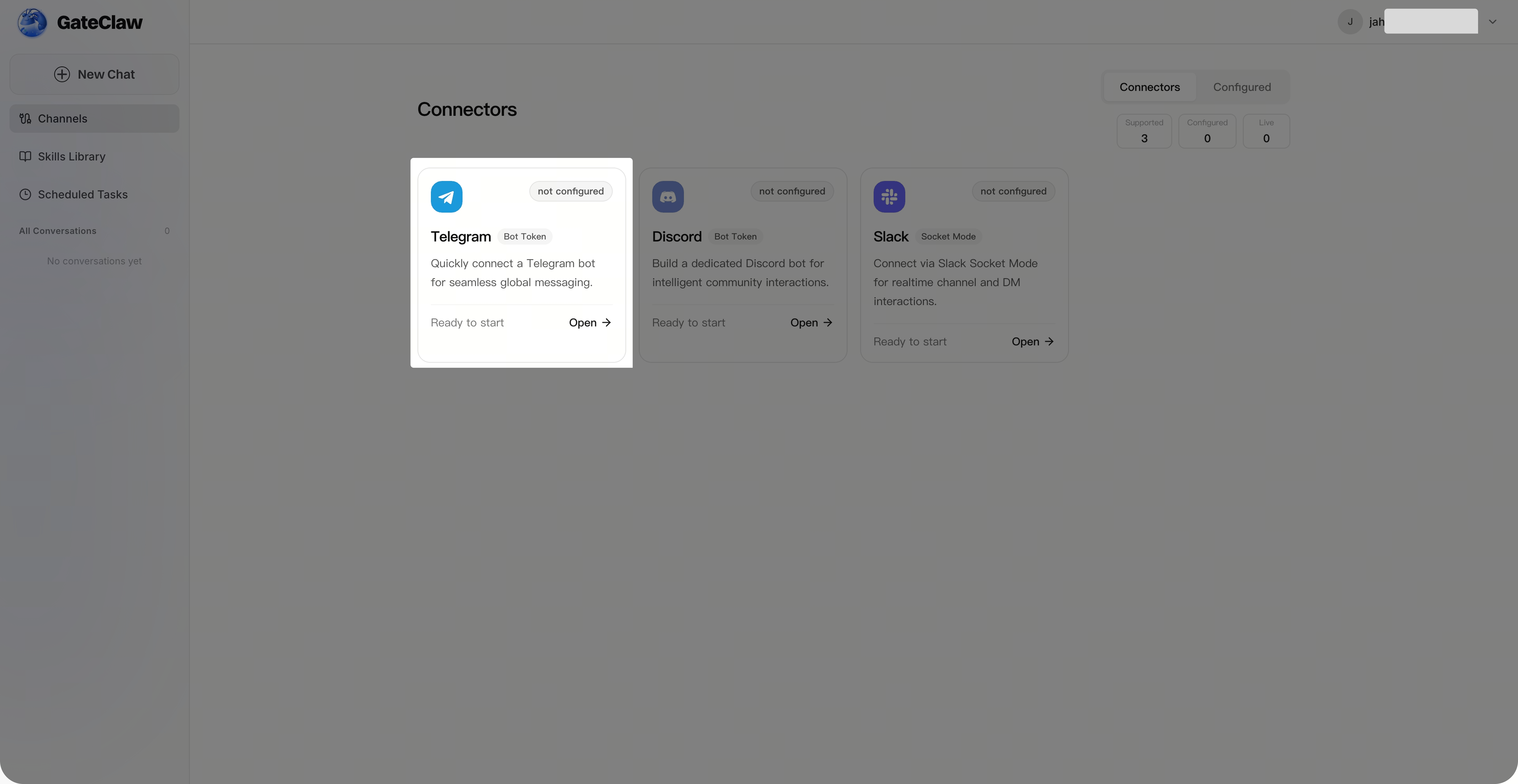
Paso 2: Configurar Telegram
En la página [GateClaw] - [Conexiones], selecciona [Telegram]. Aparecerá la página de configuración de Telegram, donde tendrás que introducir el Bot Token (puedes continuar con el siguiente paso).
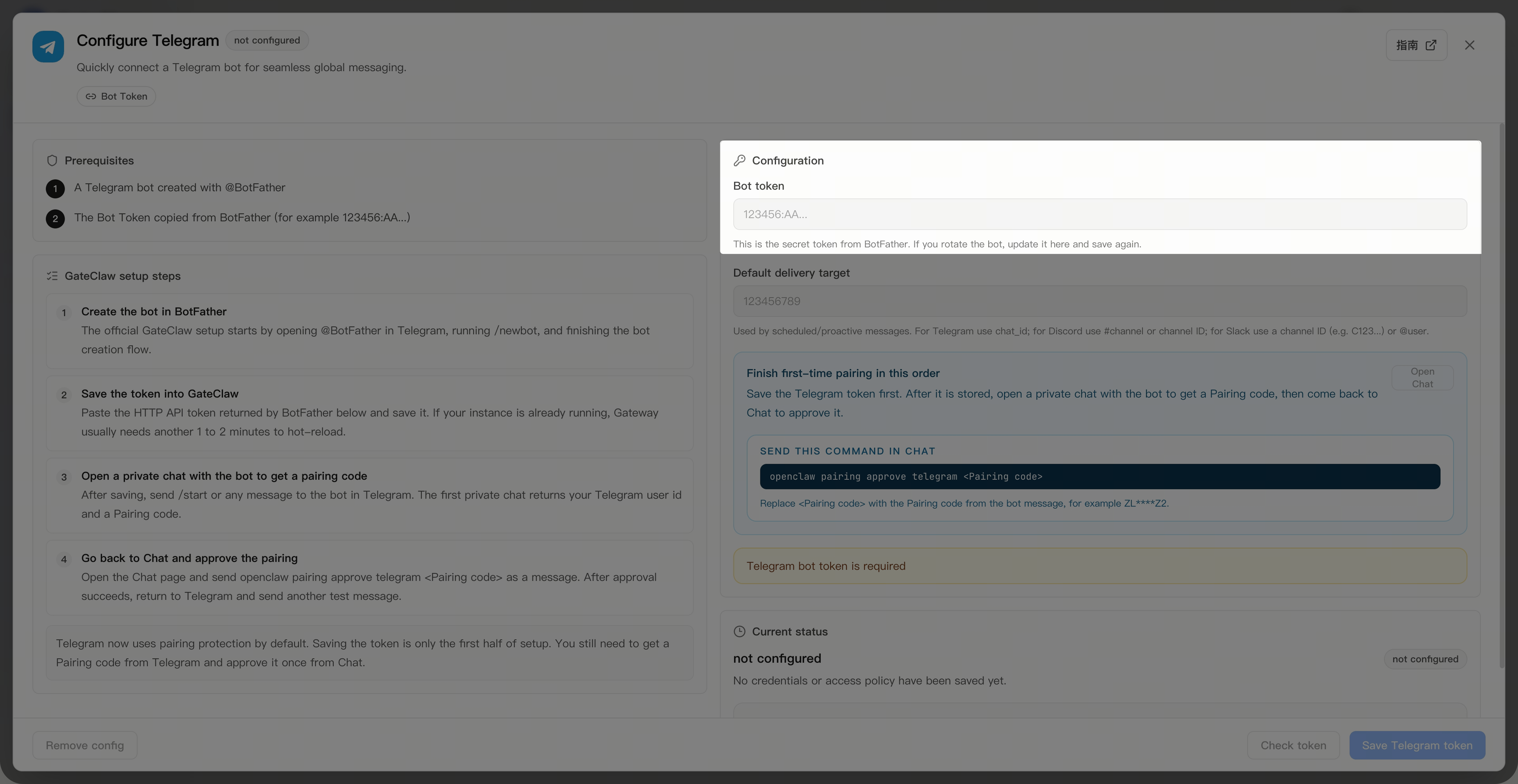
Paso 3: Obtener el Bot Token
Realiza las siguientes operaciones en tu [Telegram] para obtener el Bot Token de tu bot de Telegram.
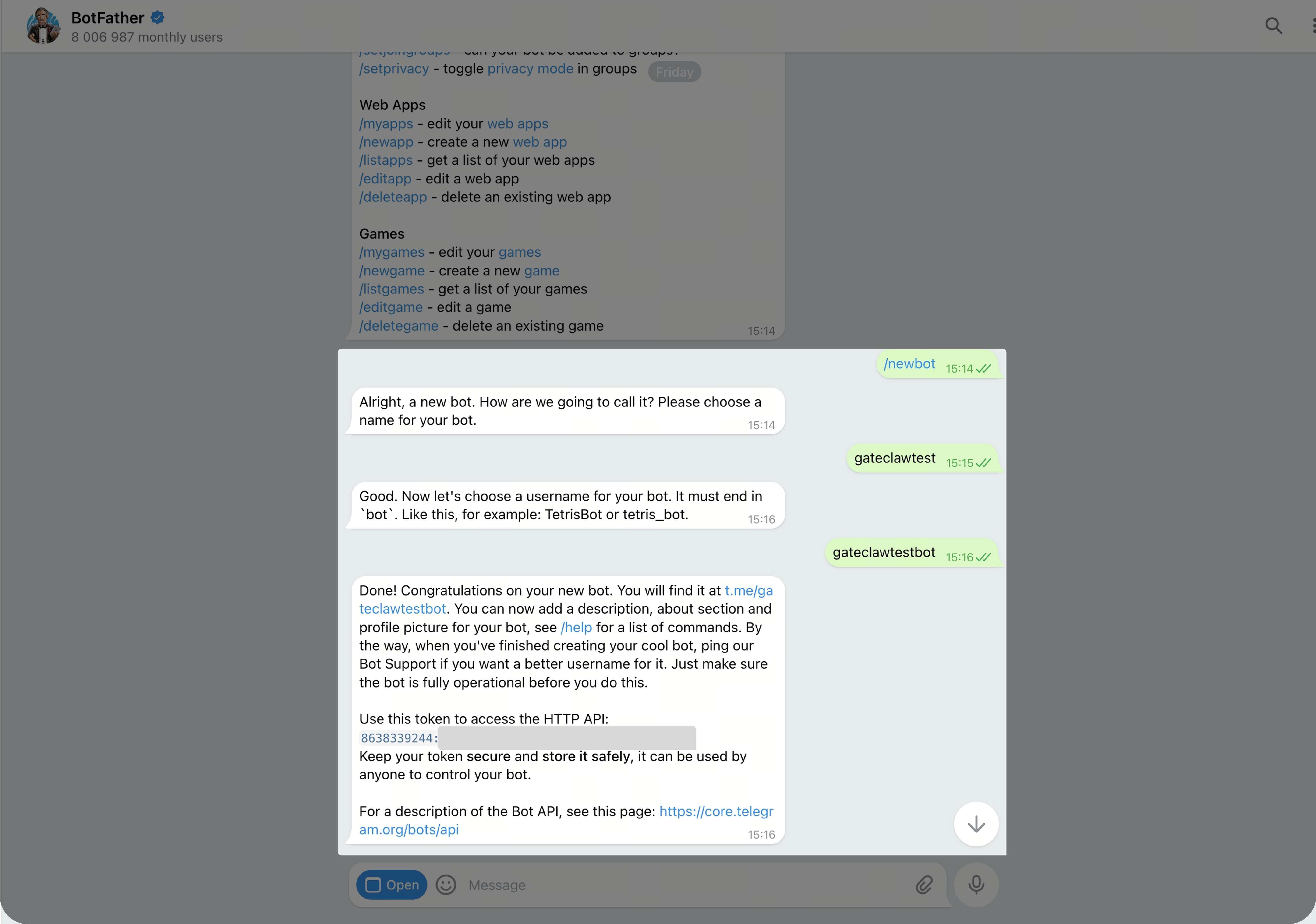
- Busca a BotFather en tus chats de Telegram, haz clic para iniciar una conversación y escribe
/newboten la ventana de chat y envíalo - BotFather te pedirá que personalices el nombre del bot. Puedes introducir un nombre personalizado y enviarlo
- BotFather te pedirá que personalices un nombre de usuario para el bot (debe terminar en "bot"). Puedes introducir un nombre personalizado y enviarlo
- Tras superar la comprobación del nombre, BotFather te confirmará que la creación del bot se ha completado y te proporcionará información, incluido el HTTP API del bot (es decir, el Bot Token, que puedes copiar y guardar)
Paso 4: Completar la configuración de Telegram
Vuelve a la página [GateClaw] - [Conexiones] - [Telegram]. Introduce el Bot Token que has copiado, guárdalo y espera a que se complete la configuración.
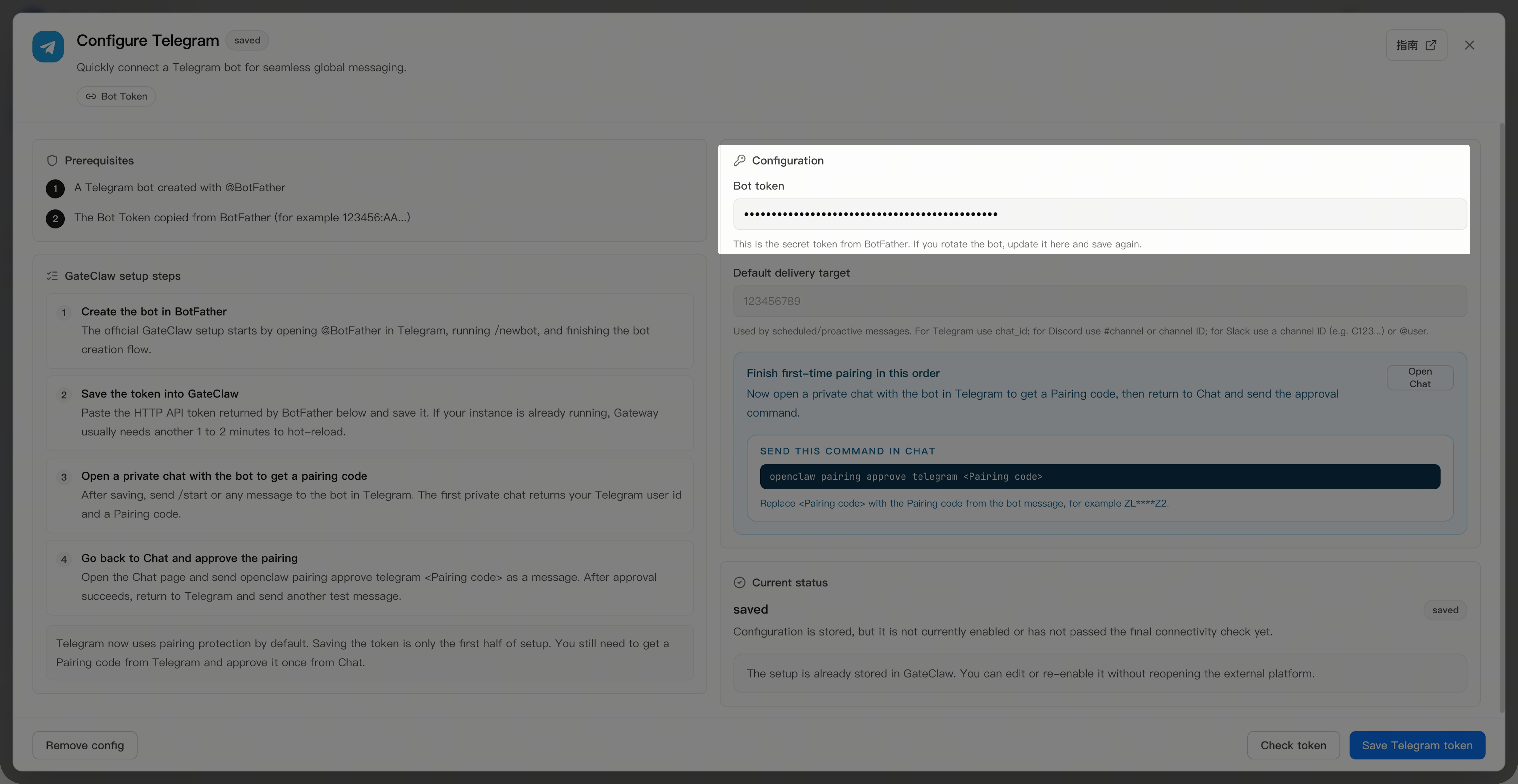
Paso 5: Obtener el código de emparejamiento del bot
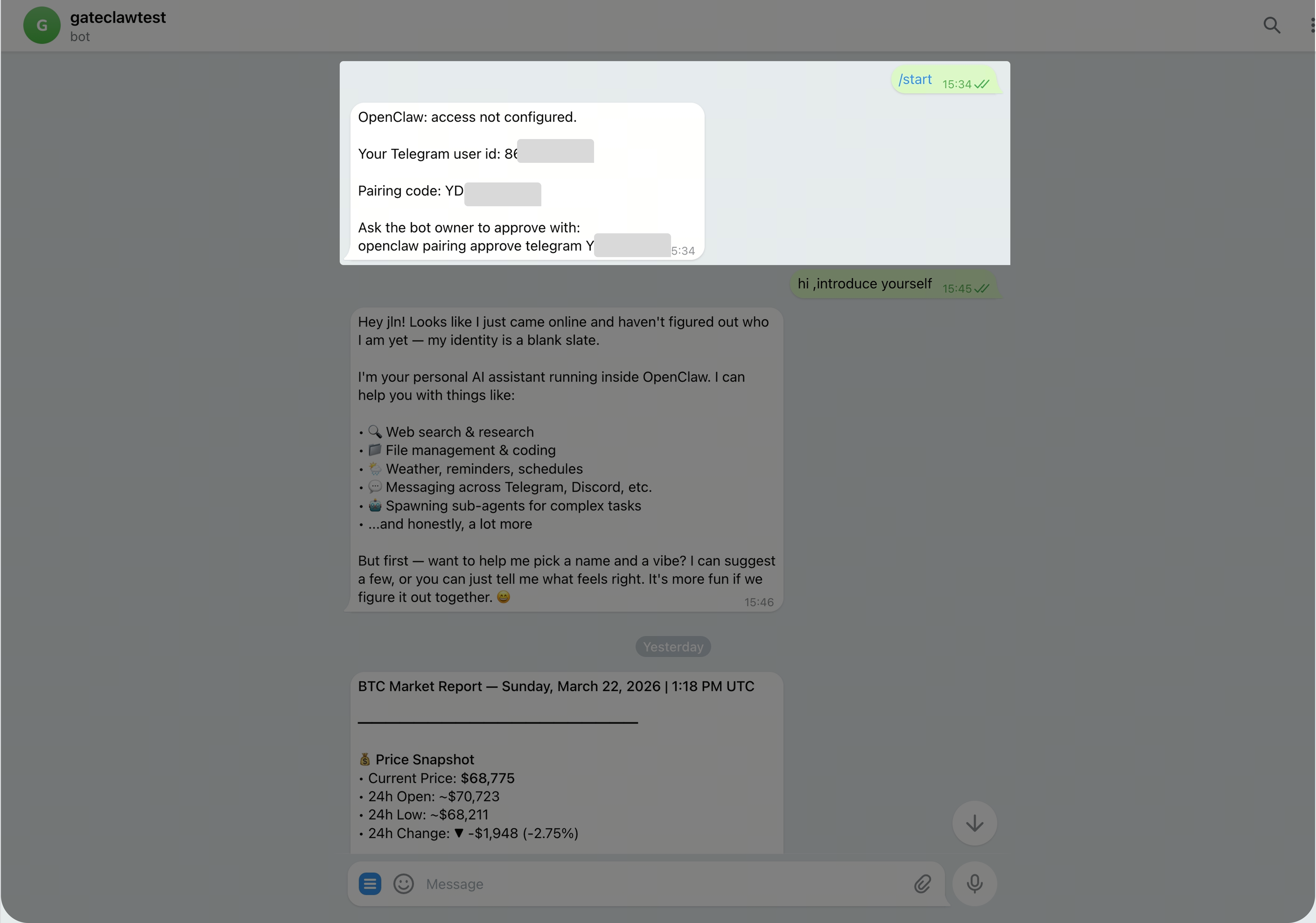
En la ventana de conversación con BotFather en [Telegram], haz clic en el nuevo bot que has creado para iniciar una conversación. Escribe /start en la ventana de chat. El nuevo bot responderá con su user ID (es decir, chat ID) y el código de emparejamiento. Copia el user ID y el código de emparejamiento.
Paso 6: Completar el emparejamiento del bot
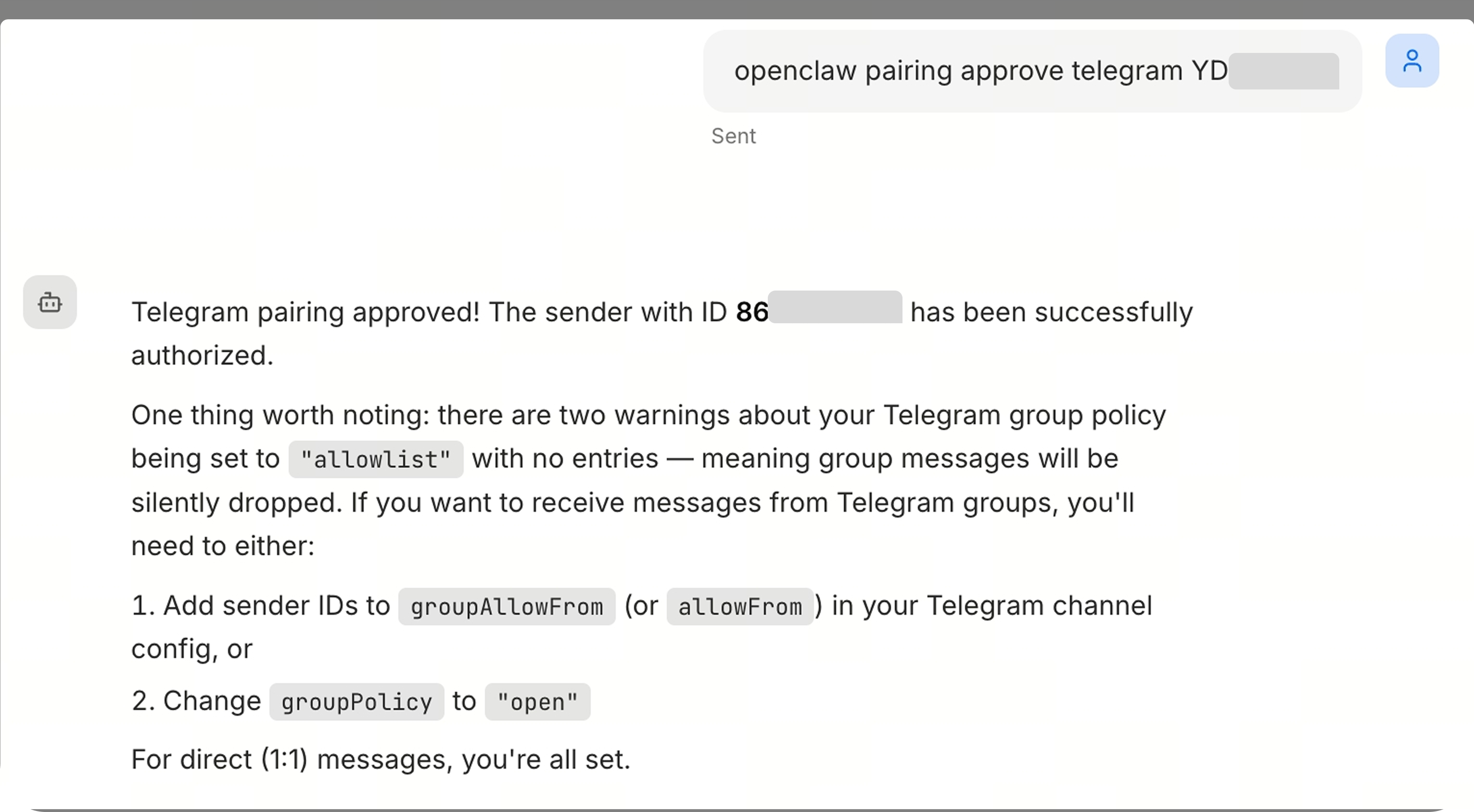
Vuelve a la ventana de conversación de [GateClaw] e introduce: openclaw pairing approve telegram pairing code (puedes añadir aquí el chat ID, o bien configurarlo y guardarlo a través de la función de configuración de Telegram). GateClaw te responderá indicando que el emparejamiento se ha realizado correctamente.
Paso 7: Conversación en Telegram
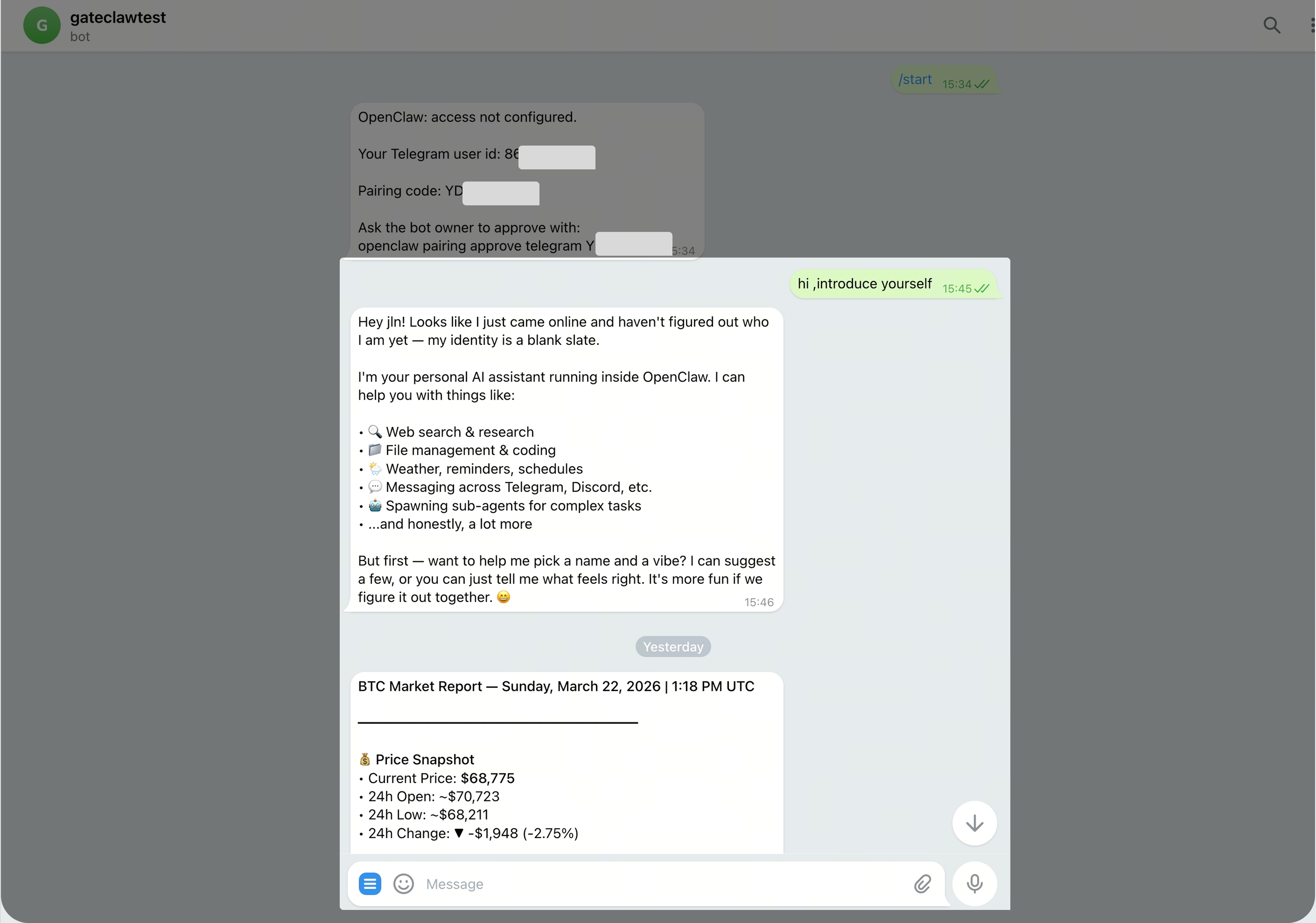
En la ventana de conversación con tu bot en [Telegram], puedes escribir: "Preséntate". Tu bot de GateClaw responderá indicando que acaba de conectarse. Puedes asignarle un nombre y definir sus características de identidad mediante lenguaje natural.
Preguntas frecuentes
Q1: ¿Qué es BotFather?
A: BotFather es la herramienta oficial de gestión de bots de Telegram, utilizada para crear y administrar bots de Telegram.
Q2: ¿Cuál es la diferencia entre el Bot Token y el código de emparejamiento?
A: El Bot Token se utiliza para la autenticación del bot, mientras que el código de emparejamiento sirve para vincular tu cuenta de Telegram con GateClaw.
Q3: ¿Qué debo hacer si falla el emparejamiento?
A: Por favor, asegúrate de que el código de emparejamiento y el chat ID se han introducido correctamente, y que el código de emparejamiento no ha caducado. Si el problema persiste, obtén un nuevo código de emparejamiento.
Q4: ¿Puedo asignar un nombre personalizado al bot?
A: Sí. Tras emparejarlo correctamente, puedes indicar al bot el nombre y las características de identidad que desees mediante lenguaje natural.
Q5: ¿Cómo encuentro el bot tras crearlo?
A: Introduce el nombre de usuario del bot que has creado (debe terminar en "bot") en la barra de búsqueda de Telegram, y así podrás encontrarlo e iniciar una conversación con él.
Notas importantes
GateClaw interactúa contigo a través del bot de Telegram. Todo el contenido que envíes al bot y recibas de él debe cumplir con los Términos de Servicio de Telegram. Si tu cuenta de Telegram es restringida o bloqueada debido a contenido prohibido enviado o recibido a través del bot, Gate no asume ninguna responsabilidad.
Descargo de responsabilidad
El contenido aquí proporcionado es solo para fines de referencia y educativos, y no constituye asesoramiento financiero, de inversión, comercial ni legal, ni constituye una oferta o solicitud para comprar o vender activos digitales. Gate no realiza declaraciones ni garantías, expresas o implícitas, sobre la exactitud, integridad o actualidad de la información contenida en este documento. Las características del producto, interfaces, normas y estructuras de tarifas pueden actualizarse o modificarse en cualquier momento. Consulta los comunicados más recientes y la información que aparece en la plataforma de Gate para obtener los detalles más precisos.
Las inversiones en activos digitales implican un riesgo significativo y los precios pueden fluctuar considerablemente. Podrías perder la totalidad de tu inversión. Toma decisiones con cautela en función de tu situación financiera y tolerancia al riesgo, una vez que hayas comprendido plenamente los riesgos asociados. Si es necesario, te recomendamos consultar con un asesor financiero o legal independiente.
Para más información sobre los posibles riesgos, consulta la Divulgación de riesgos y el Acuerdo de usuario de Gate.
